Welcome to the Inedo Forums! Check out the Forums Guide for help getting started.
If you are experiencing any issues with the forum software, please visit the Contact Form on our website and let us know!
Proget docker registry - multiple connectors?
-
We have just recently downloaded and setup Proget (5.2.27 Build 6) and are experimenting with it to decide if we want to continue using it.
We have a container registry setup and I was able to add a connector to it for Docker Hub easily enough. That said, we do a lot of .NET development, so a number of our source images also come from Microsoft's registry. However, while there is a link present on the form to "add connector", clicking it doesn't allow me to actually add one. It brings up an odd form with the Feed name and a "Connector" dropdown box. However, the only thing present in that dropdown box is the connector that was already created. How do I create an additional one?
-
Hi @aclauss,
If you go to the feeds page in ProGet, in the upper left corner you should see a toggle button that has two options:
FeedsandConnectors. Please click theConnectorsbutton and you should see a list of your connectors. From there you can clickCreate Connectorto create a new connector.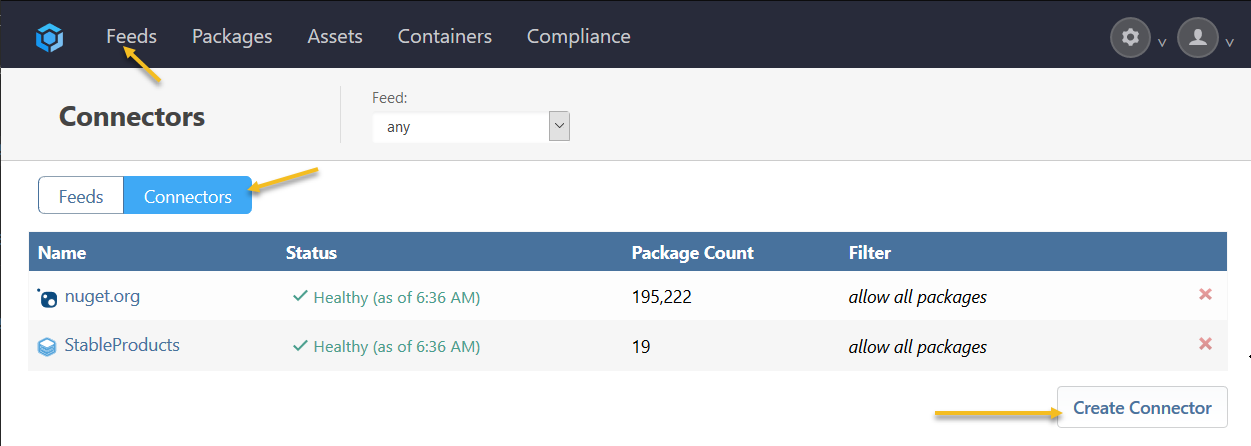
Once you create the connector, you can tie it to your feed by going back to the manage feed page, click connectors, and now that connector dropdown you see before should contain the connector you recently created.
Hope that helps!
Thanks,
Rich

Hello! It looks like you're interested in this conversation, but you don't have an account yet.
Getting fed up of having to scroll through the same posts each visit? When you register for an account, you'll always come back to exactly where you were before, and choose to be notified of new replies (either via email, or push notification). You'll also be able to save bookmarks and upvote posts to show your appreciation to other community members.
With your input, this post could be even better 💗
Register Login