Welcome to the Inedo Forums! Check out the Forums Guide for help getting started.
If you are experiencing any issues with the forum software, please visit the Contact Form on our website and let us know!
ssl certificate does not work
-
hi,
i am using the free version v2024.24
i have created ssl certificate using my company pki and it is imported without problems to the server.
i have tried both "certificate file" and "microsoft certificate store" and they both does not work.
the error i get is "failed to load certificate for https connections. the system cannot find the path specified".what could be the problem ? how do i need to configure the cert req. params ?
i have tried configuring "common name" with fqdn and without. i have added san with both options too.10x
-
Hi @udi-moshe_0021,
Certificate configurations can be a bit tricky to resolve due to the many different types of certificates that can be generated. To start, are you using the integrated web server or IIS on your installation?
The first thing to check is that your certificate with either IWS or IIS is making sure that your certificate contains the private keys. That is required for any certificate problems. If you are on Windows, the easiest way to use the certificate is using the Windows Certificate Store. Once you have imported it into your certificate store, check that your have permissions to manage private keys.
If you are still haveing issues getting teh certificate to load, then you may want to switch to referencing your certificate using it's thumbprint.
If you are trying to link directly to the certificate instead of using the windows certificate store, you will still need to make sure the certificate has the private keys included, but you may need to convert your certificate to a ".pfx" or a ".pem" file. Although we have had success using a .crt and a .key file, we find it can be a bit finicky in comparison. Although I don't have the exact command to run, you should be able to easily find openssl commands to convert the certificate. Similar to this command:
openssl pkcs12 -export -out output.pfx -inkey private_key.key -in certificate.crtIt's hard to give an exact command since I don't know all the details on your certificate and key files. We also have some notes on how to convert PKI generated certificates to a ".pem" file in our in our HTTPS Binding to a Port (Advanced) docs. Just scroll down to the Update Configuration file and look at the commands we have there to convert the certificate.
This should be a pretty good starting point for this, but please let me know what works and what doesn't and then we can go from there.
Thanks,
Rich -
@rhessinger ,
thank you. i am familiar with all the certificate process and i have done this hundreds of times.
i do have a private key and did export correctly to pfx.
mo matter which way i choose, pfx or cert store, i get the same error.
i am using internal web server.
ssl was working until the certificate expired.
is there a debug mode ? logs that are more accurate ? is it related to the DB maybe ?thanks,
udi -
Hi @udi-moshe_0021,
Thanks for the information and I appreciate the background. Did you try the method of referencing the certificate by it's thumbprint while using the Windows Store? The only logs we have is if you run the IWS in a console instead of as a Windows service. This will allow you to see the console output from .NET when we register the certificate. You can do that with the following command:
"C:\Program Files\ProGet\Service\ProGet.Service.exe" run webonlyBased on the error you originally provided though, that error almost always means that the Service Account doesn't have access to the certificate and it's private keys. Can you tell me a little more about your setup?
- Are you binding only the port (
Urls="http://*:80;https://*:443"in the config file ) or did you configure it for port sharing? - Is there a proxy in front of your site?
- What account are you running your IWS service as, Network Service, local domain account, etc....?
Thanks,
Rich - Are you binding only the port (
-
Hi @rhessinger ,
to answer your questions:
- i use the default configuration and binding. i bind it to port.
- no reverse proxy. i configured proget to get out using proxy but to get into proget there is no proxy.
- i use local computer account configured as administrator.
i ran the command you suggested. upon configuring proget to use pfx, there is no error displayed other than "... path to object not found". upon trying to configure it to use windows cert store i got error of "task cancelation...". if you need the full error i will provide it on sunday next week.
thanks,
udi -
Hi @udi-moshe_0021,
If you could please share all of the output, that would be helpful.
Thanks,
Rich -
Hey @udi-moshe_0021,
My InedoOps PowerShell module has a Set-ProGetSSLConfig function that helps setups ProGet to server up content via HTTPS.
The nice thing about this particular function is that, since it doesn't interact with ProGet's web interface, but rather configuration, it can be ran standalone.
You can find the function here: https://github.com/steviecoaster/InedoOps/blob/main/source/public/Utility/Set-ProGetSSLConfig.ps1
The first example is likely the one you'll want to follow, but pay attention to the URL parameter and adjust it as needed as you'll likely want to use
https://*:443/for the value (or whatever port you typically serve SSL traffic over to ProGet).As mentioned by @rhessinger this is likely a permissions issue on the private key, which the above handles for you.
Hope that helps!
-
hi @steviecoaster ,
i will try this powershell and let you know.
will add the output as well.thanks,
udi -
Hi,
i can confirm that we have upgraded to 2nd latest version and it still does not work.
i haven't tried the script because i can see that the config file is updating according to my configuration but still does not work.
i have tried binding to another port and configure the certificate to use pem and tried with and without password for the private key in pem format. problem not solved.i will upload the error we get.
thanks,
udi
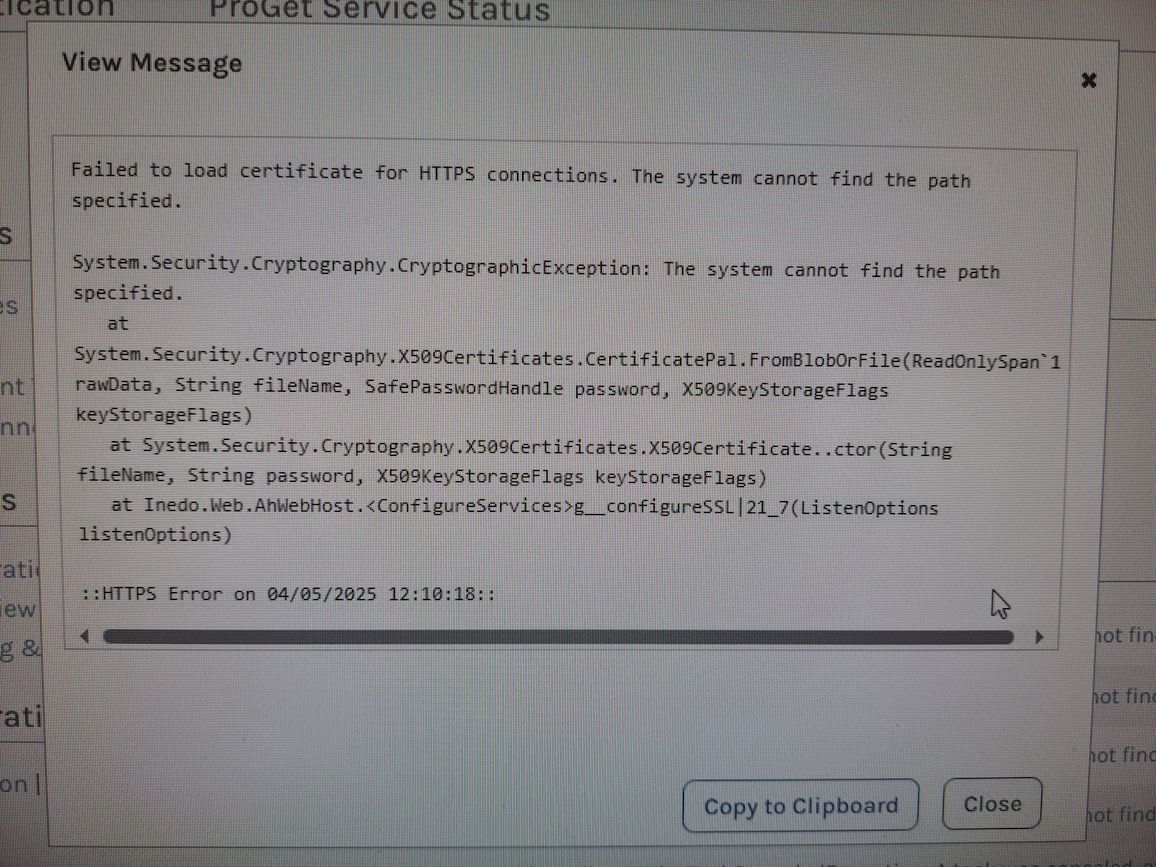
-
another update...
i have noticed that the configuration is changed in the config file but it did not change in the configuration section in the admin console ui.
college of mine combined private key (without password) and public key under the name and path of the old successful file and it worked with the new certificate when trying to configure the same files uncombined, it failed as mentioned in the previous post.hope this will give you some direction to solve this problem.
thanks,
udi -
It seems like you are dancing around the fact that this is permissions issue on the private key. This is a windows host, correct? and you are attempting to use a certificate that is inside an Windows Certificate store?
If so I urge you to try the code I linked, instead of fighting it :)
-
@steviecoaster ,
thank you for your time. i have downloaded the script and checked it and it has a lot of references to the internet and it will be difficult for me to run it as is.
i am using windows and as stated in the previous threads, i have tried any combination except for using thumbprint and no luck what so ever even when i used unencrypted key so i am trying to understand what are the permission issues you see. -
The issue on windows is that the Service user running the Inedo web service doesn't have permissions to the private key on WIndows. The script can run 100% offline standalone. There are 0 references to the internet inside of it. The only way you would need the internet to use it is if you use Install-Module to install the entire InedoOps module, which you do not need to do. You could simply copy the function, and run it.
It is obviously good practice to read any code you find online before you blindly run it, but there are 0 references to the internet. Unless you are referring to the -Urls parameter. That is so you can control what port your ProGet web interface is bound too with your SSL certificate, not the internet in general.
-
It just occured to me that you probably only need the Set-CertPermission function. If you're just renewing a cert, everything else should be fine in your config.
You can call this on its own as well: https://github.com/steviecoaster/InedoOps/blob/main/source/private/Set-CertPermissions.ps1
-
@steviecoaster ,
regarding the internet references in the script, i want to straight things up. i have right clicked on the link and pressed on "save as..." and it downloaded the whole html page. i entered into the link and downloaded the script itself. i will run the script and see if it helps.10x
-
Ah, that makes more sense! Yeah, Github is weird like that. I think if I provided the raw link then that right-click would have worked. Sorry for the confusion!
-
@udi-moshe_0021 Hello, did you have any luck getting this to work? I am trying to get the certificate to work as well for testing. I would appreciate any feedback. I will probably try @steviecoaster scripts as well to see if that works. I am running 2025.5 and I am using IIS as a reverse proxy to get SSL to work. Less than desirable but we need to get this secured. Thanks!
-
@Jonathan-Engstrom Hi,
unfortunately, i didn't had the time to try and fix it and we kind of left it like it is.
it troubles me that you have the same problem in the latest version too. -
My fix unfortunately was to fall back to 2024.39 and use IIS with SQL 2022. I wish I could of used postgres, but I really don't have time to geek out on this; I need it to just work and be secured with ssl. The URL rewrite made some weird things happen, something to do with compression. Once proget was installed, I deleted the default site, added a binding on the proget site for 443, removed the http and it just worked. Getting ssl to me is more valuable than whatever benefits that IWS provide, which to me don't appear to be any. IWS is like a black box, with no logs and no management. So until ssl works with a "Web Server" certificate template issued from our Active Directory Certificate Service on IWS, this is a hard no-go for me.
@steviecoaster Thanks for providing those links, but I am not sure they are up to date for for IWS and/or proget 2025? Also, the Set-CertPermissions.ps1, are you doing that to a certificate that's already in the store, or exporting it and applying acl's to it and then point the IWS certificate to use that while not imported into the store? I am figuring the latter as one get the location based on just the thumbprint alone. Also, some examples and filling out the help would be great too. Thank you for this work, it is appreciated.
-
@Jonathan-Engstrom something like this? https://steviecoaster.github.io/Pagootle/Commands/Set-ProGetSslConfig/



Hello! It looks like you're interested in this conversation, but you don't have an account yet.
Getting fed up of having to scroll through the same posts each visit? When you register for an account, you'll always come back to exactly where you were before, and choose to be notified of new replies (either via email, or push notification). You'll also be able to save bookmarks and upvote posts to show your appreciation to other community members.
With your input, this post could be even better 💗
Register Login