Inedo Community Forums Forums
    • Recent
    • Tags
    • Popular
    • Login

    Welcome to the Inedo Forums! Check out the Forums Guide for help getting started.

    If you are experiencing any issues with the forum software, please visit the Contact Form on our website and let us know!

    Buildmaster - High CPU database since 6.2.22

    Scheduled Pinned Locked Moved Support
    30 Posts 2 Posters 61 Views
    Loading More Posts
    • Oldest to Newest
    • Newest to Oldest
    • Most Votes
    Reply
    • Reply as topic
    Log in to reply
    This topic has been deleted. Only users with topic management privileges can see it.
    • atrippA Offline
      atripp inedo-engineer
      last edited by

      Thanks Philippe!! That's helpful.

      Can you try this sql?

      USE [BuildMaster]
      
      BEGIN TRANSACTION
      
      DELETE [Executions]
       WHERE [ExecutionMode_Code] IN ('R', 'M', 'T')
         AND ROW_NUMBER() OVER(PARTITION BY [ExecutionMode_Code] ORDER BY [Execution_Id] DESC) > 1000
      
      SELECT [ExecutionMode_Code], COUNT(*) FROM [Executions] GROUP BY [ExecutionMode_Code]
      
      ROLLBACK
      

      You should then see results like this:

      R 1000
      M 1000
      S 1560
      T 377
      B 999
      

      You can further inspect the tables, but this should do the trick. If the results look okay, then please run only the DELETE statement and then it will be fine.

      Can you let me know if it works? we will incorporate this logic in BM-3659

      1 Reply Last reply Reply Quote 0
      • P Offline
        philippe.camelio_3885
        last edited by

        I have this error msg from SQL Management Studio or from osql

        Msg 4108, Level 15, State 1, Line 7
        Les fonctions fenêtrées peuvent uniquement apparaître dans les clauses SELECT ou ORDER BY
        

        I am not good enough in SQL to overcome this. Any tricks ?

        1 Reply Last reply Reply Quote 0
        • atrippA Offline
          atripp inedo-engineer
          last edited by

          My bad, can you try this instead? Basically we are trying to delete all "R, M, T" executions except the most recent 1000 of each type.

          This is what the code is doing now, just really inefficiently for some reason -- and the inefficiency seems to have caused a "backlog" of sorts.

          USE [BuildMaster]
          
          BEGIN TRANSACTION
          
          DELETE [Executions]
            FROM [Executions] E,
               (SELECT [Execution_Id], 
                       ROW_NUMBER() OVER(PARTITION BY [ExecutionMode_Code] ORDER BY [Execution_Id] DESC) [Row]
                 FROM [Executions]
                WHERE [ExecutionMode_Code] IN ('R', 'M', 'T')) EE
          WHERE E.[Execution_Id] = EE.[Execution_Id]
            AND EE.[Row] > 1000
          
          SELECT [ExecutionMode_Code], COUNT(*) FROM [Executions] GROUP BY [ExecutionMode_Code]
          
          ROLLBACK
          
          1 Reply Last reply Reply Quote 0
          • P Offline
            philippe.camelio_3885
            last edited by philippe.camelio_3885

            Buildmaster is broken 😥
            Time out when I try to get an access to BM.

            I reboot unsuccessfully

            but the Database is clean

            R	1000
            M	1000
            S	1586
            T	380
            B	1025
            1 Reply Last reply Reply Quote 0
            • P Offline
              philippe.camelio_3885
              last edited by

              I had to stop SQL Instance, Restart BM Service
              Everything looks fine

              1 Reply Last reply Reply Quote 0
              • P Offline
                philippe.camelio_3885
                last edited by

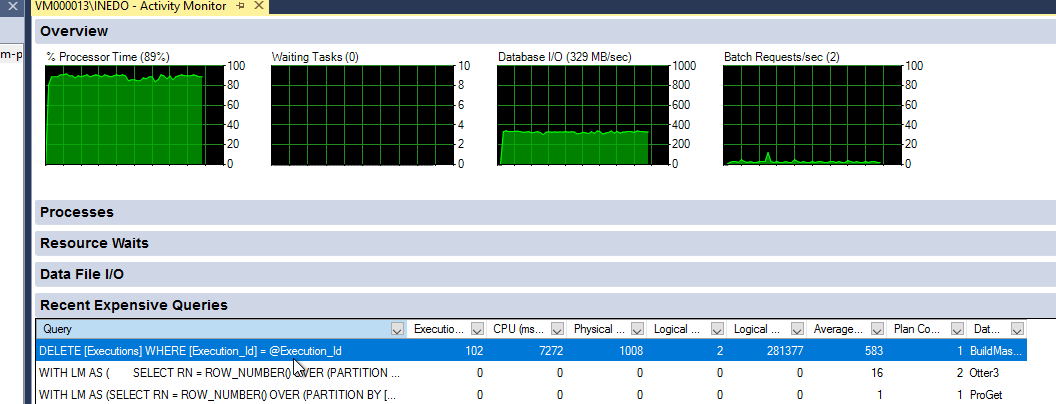
                The request still eating all my CPU :(
                5a911e99-e65c-4b19-bbd8-272be81ded0b-image.png

                1 Reply Last reply Reply Quote 0
                • atrippA Offline
                  atripp inedo-engineer
                  last edited by

                  How often is this happening? It shows 102 executions were purged, and based on the I/O there was a lot of logs deleted... this can be actually quite resource-intensive, as there are a lot of log data.

                  But this usually happen during off-hours, etc., so it shouldn't be disturbing.

                  P 1 Reply Last reply Reply Quote 0
                  • P Offline
                    philippe.camelio_3885 @atripp
                    last edited by philippe.camelio_3885

                    @atripp
                    Unfortunately, it is disturbing.

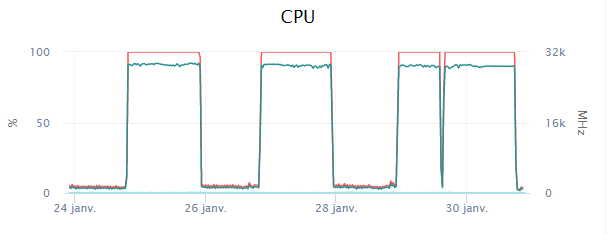
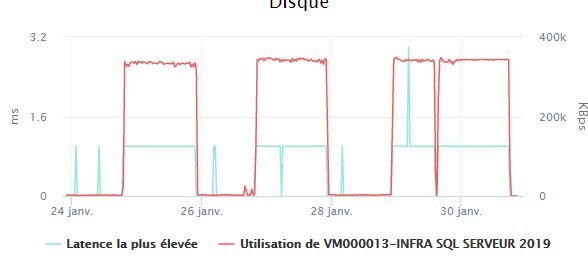
                    I join 2 screenshoot about the impact of the delete sql and it is happening during working hours.

                    I find that deleting several hours of CPU and IO for only 102 purged executions take too long

                    As I said, the problem exists since release 6.2.22.

                    I stopped all retention policies,

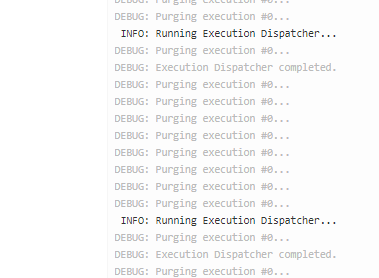
                    The problem occurs when the Manual Execution Cleanup is running
                    ae5596e6-3bd1-446f-ad18-819b1b59a11f-image.png

                    ==============

                    40cb28d8-4c5b-43f5-9e00-19f262b07049-image.png

                    f5e93e31-d3df-449a-a846-8a931122ac1a-image.png

                    I ran again your code:
                    Before the execution:

                    b536a5c6-f9f9-4e3a-917e-4888440fd129-image.png

                    After

                    (255268 rows affected)
                    
                    Completion time: 2021-01-30T22:06:02.9603752+01:00

                    

                    21f5c092-4ba4-4616-bdf7-f5254701b24c-image.png

                    SELECT [ExecutionMode_Code], COUNT(*) FROM [Executions] GROUP BY [ExecutionMode_Code]
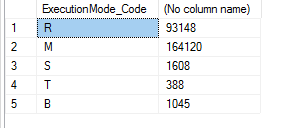
                    

                    29644d1e-092e-444a-b1d8-40921129c6a6-image.png

                    I set Retention.KeepLastManualExecutionCount to 50.

                    I will see what is going on

                    Best Regards
                    Philippe

                    PS - Thanks for the help

                    P 1 Reply Last reply Reply Quote 0
                    • P Offline
                      philippe.camelio_3885 @philippe.camelio_3885
                      last edited by philippe.camelio_3885

                      This is what is happening if I force Manual Execution Cleanup to run.
                      The stop of the BuildMaster Service solved the problem, but BM is down :(

                      d53e43a7-39f9-46a0-a71e-8233c85c8dd0-image.png

                      To be more complete, here is the steps I followed

                      1 Execution of the delete script
                      2 Restart buildmaster
                      4 Start Manual Execution Cleanup ==> Problem occurs
                      4 Start Manual Execution Cleanup ==> Problem occurs

                      1 Reply Last reply Reply Quote 0
                      • atrippA Offline
                        atripp inedo-engineer
                        last edited by

                        If I'm understanding correctly, did your the Manual Execution records go from 1000 to 164,000 in just a few days? If so, that would explain a lot....

                        These are the types of so-called Manual Executions:

                        • Importing or Exporting Applications
                        • Cloning and Applying Template to Applications
                        • Sync of Issue Sources
                        • Deploying Configuration file
                        • Upgrading Inedo Agents
                        • Sync infrastructure

                        They are supposed to only occur on a manual basis, like when you trigger something from the UI so you can get logs. Or, in the case of sync infrastructure, whenever infrastructure changes.

                        Any idea what all the manual executions could be?

                        P 1 Reply Last reply Reply Quote 0
                        • P Offline
                          philippe.camelio_3885 @atripp
                          last edited by

                          @atripp said in Buildmaster - High CPU database since 6.2.22:

                          Importing or Exporting Applications **==> ** never done this **
                          Cloning and Applying Template to Applications **==> ** one time a month maximum ****
                          Sync of Issue Sources ==> Not sure what this is about ???
                          Deploying Configuration file **==> ** No ****
                          Upgrading Inedo Agents ==> done by Otter in my case
                          Sync infrastructure ==> Used to sync every 2 hours from Otter. I increased since the last post to one day

                          I have about 100-110 servers (Linux / windows) sync from Otter, whereas I am using a just a few for deploying application (about 25 actually).
                          I have plenty of Role

                          It could be Sync infrastructure, any way to check ?

                          1 Reply Last reply Reply Quote 0
                          • atrippA Offline
                            atripp inedo-engineer
                            last edited by

                            The Execution_Configuration column of the ManualExecutions table will give a clue; it's XML but if you expand the coluumn, you'll see the name of the manual execution.

                            It's only supposed to log if something changed, however...

                            If there's a bug, one way to check would be to disable infrastructure sync, for the time being.

                            P 1 Reply Last reply Reply Quote 0
                            • P Offline
                              philippe.camelio_3885 @atripp
                              last edited by

                              @atripp
                              I disabled the Infrastructure sync.
                              Then I clean up the table

                              Table size before
                              c15f62af-2b64-419f-8842-abfebe1b298a-image.png

                              Disable Infrastructure sync
                              Stop buildmaster
                              Cleanup
                              637f1405-8347-4127-b10b-1dfafbd70b42-image.png

                              Table size after
                              7e13bece-c747-4aa5-bcb4-95ab69cfaecd-image.png

                              Restart buildmaster

                              I will check tomorrow about the size and let you know

                              Thanks

                              1 Reply Last reply Reply Quote 0
                              • P Offline
                                philippe.camelio_3885
                                last edited by

                                I put some new screenshoots

                                3660cc84-6b66-4cdf-aa42-e8a721f52709-image.png

                                48e877c1-7edd-476c-92c4-3dad5260532e-image.png

                                97dad5a9-12bc-4de0-92c2-61e823c4766e-image.png

                                and a lot of this kind of msg

                                71cd38bd-caf5-4ed0-9c1f-edb4ea42ad92-image.png

                                In 10 hours:

                                • ScopedExecutionLogentries x 20 (600k -> 12M)
                                • ScopedExecutionLogs : x 34
                                • ManualExecutions x 164

                                dbf630f4-6f97-4440-9587-bbb74ce79c50-image.png

                                I set Service.AgentUpdaterThrottle to -1
                                I also increase to 1 hour in order to reduced log.
                                540171dc-7cc2-41fe-8c37-19a6958fa18c-image.png

                                I will check tomorrow morning

                                atrippA 1 Reply Last reply Reply Quote 0
                                • atrippA Offline
                                  atripp inedo-engineer @philippe.camelio_3885
                                  last edited by

                                  Thanks @philippe-camelio_3885

                                  So, the good news is, we've identified the problem. There was just a huge number of manual executions happening, for some reason, and the manual execution purging routine could never catch up. Changing those throttles wouldn't make a difference I'm afraid, as none will trigger a manual execution...

                                  At first, can you please share the results of this query, so we can see what made all those?

                                  SELECT [ExecutionType_Name], COUNT(*) FROM [ManualExecutions] GROUP BY [ExecutionType_Name]

                                  That will tell us what Manual Executions are around, mostly so we can understand what it is. I suspect, infrastructure sync.

                                  That being said... the first thing I'm now seeing is that the report looks old. It's because the number of rows is 164,125, which is the exact same number as from before. So, I'm thinking, actually, you didn't commit the transaction in the query I posted before? It included a ROLLBACK statement as a safety measure... that's my fault, I should have said to only run DELETE if you were satisfied.

                                  Since the query seems okay (it reduced rows from 164K down to 1k), please run this:

                                  DELETE [Executions]
                                    FROM [Executions] E,
                                       (SELECT [Execution_Id], 
                                               ROW_NUMBER() OVER(PARTITION BY [ExecutionMode_Code] ORDER BY [Execution_Id] DESC) [Row]
                                         FROM [Executions]
                                        WHERE [ExecutionMode_Code] IN ('R', 'M', 'T')) EE
                                  WHERE E.[Execution_Id] = EE.[Execution_Id]
                                    AND EE.[Row] > 1000
                                  

                                  From here, it should actually be fine...

                                  1 Reply Last reply Reply Quote 0
                                  • P Offline
                                    philippe.camelio_3885
                                    last edited by

                                    @atripp

                                    SELECT [ExecutionType_Name], COUNT(*) FROM [ManualExecutions] GROUP BY [ExecutionType_Name]

                                    90b3753d-fa98-4f2c-9f14-05f0082ee30b-image.png

                                    After my last post I purged again the table and it did not increase today. - no rollback I am pretty sure

                                    5e9e94e2-0d16-4f6f-8308-756f453b94b7-image.png

                                    I put again Sync Infra to 1 hour and ran the to following SQL

                                    use BuildMaster
                                    SELECT [ExecutionType_Name], COUNT(*) FROM [ManualExecutions] GROUP BY [ExecutionType_Name]
                                    
                                    SELECT [ExecutionMode_Code], COUNT(*) FROM [BuildMaster]..[Executions] GROUP BY [ExecutionMode_Code]
                                    

                                    we will see tomorrow

                                    dfe7d786-23f3-49be-bd30-1ab13202bc5a-image.png

                                    anyway thank you for your time :)

                                    1 Reply Last reply Reply Quote 0
                                    • atrippA Offline
                                      atripp inedo-engineer
                                      last edited by

                                      @philippe-camelio_3885 thanks. please keep us in the loop!

                                      As expected, that's a LOT of infrastructure sync executions. I wonder why. Are there frequent variable changes on your servers/roles?

                                      There's probably something off, where it's logging when it shouldn't. We can investigate that another time, but in the meantime, the upcoming optimizations in pruning the manual executions should make this go a lot faster next time.

                                      1 Reply Last reply Reply Quote 0
                                      • P Offline
                                        philippe.camelio_3885
                                        last edited by

                                        I created on the average 2 servers a week and plenty of roles ...
                                        I am using Otter for configuration management and script deployment so I need a lot of nested roles for the Linux and Windows servers.
                                        I also add/change frequently role variables.

                                        1 Reply Last reply Reply Quote 0
                                        • P Offline
                                          philippe.camelio_3885
                                          last edited by

                                          Hello @atripp

                                          Update ofthe day
                                          Infra sync done every 3600 s

                                          2f74d268-4117-4c51-80a0-2d413f25d6a8-image.png

                                          90404f4c-2890-4f1f-8afb-ebf5db230d1c-image.png

                                          Few change in Otter this week - 12 new VM

                                          I am not sure this the Infra sync the cause of the log ....
                                          anyway, the Delete command worked fine specially after the commit 😊

                                          Cheers

                                          1 Reply Last reply Reply Quote 0
                                          • atrippA Offline
                                            atripp inedo-engineer
                                            last edited by

                                            Thanks for the update; and the upcoming fixes will certainly make it so that purging is much more efficient on the manual execution side, just in case there's an "Explosion" of executions like this.

                                            So right now, my concern is that it's "logging every sync" (once per hour), due to a sort of bug or something. Can you check what's getting logged in Infrastructure Sync? You should be able to see this under Admin > Executions, and see if you can spot a pattern?

                                            No rush. The infra sync executions should clearly show a change history of what was updated on the infra side.

                                            1 Reply Last reply Reply Quote 0

                                            Hello! It looks like you're interested in this conversation, but you don't have an account yet.

                                            Getting fed up of having to scroll through the same posts each visit? When you register for an account, you'll always come back to exactly where you were before, and choose to be notified of new replies (either via email, or push notification). You'll also be able to save bookmarks and upvote posts to show your appreciation to other community members.

                                            With your input, this post could be even better 💗

                                            Register Login
                                            • 1
                                            • 2
                                            • 1 / 2
                                            • First post
                                              Last post
                                            Inedo Website Home • Support Home • Code of Conduct • Forums Guide • Documentation