Welcome to the Inedo Forums! Check out the Forums Guide for help getting started.
If you are experiencing any issues with the forum software, please visit the Contact Form on our website and let us know!
cannot login on authenticated feeds after upgrade
-
The setup is Traefik -> Proget -> SQL Server.
WebBaseUrl is set as it was in the previous version so should not be related either. -
Hello; can you try switching to the ProGetMono container to see if it makes any difference?
If it does, can you share details of how your NuGet and Docker feeds are authenticated? And provide the specific errors you're seeing?
-
@atripp Hello atripp. Just to be clear, this occurs not only authenticating with docker but also with private NuGet authenticated feeds. I have just switched to progetmono and both private docker and NuGet feeds are authenticating correctly so the issue is related to the .NET Core release.
-
It's relevant to mention as well that in all versions, including mono I still get the below error when doing NuGet package restores. Usually, it occurs with full restores without any package cached but I guess it shouldn't happen anyway. This is only with a single client doing a restore.
An error occurred processing a GET request to http://myproget.blabla.com/nuget/feed-nuget/v3/flatcontainer/microsoft.extensions.dependencyinjection/index.json: Timeout expired. The timeout period elapsed prior to obtaining a connection from the pool. This may have occurred because all pooled connections were in use and max pool size was reached.
URL: http://...../nuget/feed-nuget/v3/flatcontainer/system.runtime.interopservices/index.json
Referrer: (not set)
User: (unknown)
User Agent: NuGet .NET Core MSBuild Task/5.7.0 (Microsoft Windows 10.0.19041)
Stack trace: at System.Data.ProviderBase.DbConnectionFactory.TryGetConnection (System.Data.Common.DbConnection owningConnection, System.Threading.Tasks.TaskCompletionSource1[TResult] retry, System.Data.Common.DbConnectionOptions userOptions, System.Data.ProviderBase.DbConnectionInternal oldConnection, System.Data.ProviderBase.DbConnectionInternal& connection) [0x0024d] in <0864334e7e474248b37afca9b637daa9>:0 at System.Data.ProviderBase.DbConnectionInternal.TryOpenConnectionInternal (System.Data.Common.DbConnection outerConnection, System.Data.ProviderBase.DbConnectionFactory connectionFactory, System.Threading.Tasks.TaskCompletionSource1[TResult] retry, System.Data.Common.DbConnectionOptions userOptions) [0x00036] in <0864334e7e474248b37afca9b637daa9>:0
at System.Data.ProviderBase.DbConnectionClosed.TryOpenConnection (System.Data.Common.DbConnection outerConnection, System.Data.ProviderBase.DbConnectionFactory connectionFactory, System.Threading.Tasks.TaskCompletionSource1[TResult] retry, System.Data.Common.DbConnectionOptions userOptions) [0x00000] in <0864334e7e474248b37afca9b637daa9>:0 at System.Data.SqlClient.SqlConnection.TryOpen (System.Threading.Tasks.TaskCompletionSource1[TResult] retry) [0x0005d] in <0864334e7e474248b37afca9b637daa9>:0
at System.Data.SqlClient.SqlConnection.Open () [0x0003b] in <0864334e7e474248b37afca9b637daa9>:0
at Inedo.Data.SqlServerDatabaseContext.CreateConnection () [0x0006c] in <13a07e71a6964ed9849f50a505055a64>:0
at Inedo.Data.DatabaseContext.ExecuteInternal (System.String storedProcName, Inedo.Data.GenericDbParameter[] parameters) [0x00064] in <13a07e71a6964ed9849f50a505055a64>:0
at Inedo.Data.SqlServerDatabaseContext.ExecuteInternal (System.String storedProcName, Inedo.Data.GenericDbParameter[] parameters) [0x00005] in <13a07e71a6964ed9849f50a505055a64>:0
at Inedo.Data.DatabaseContext+<>c__DisplayClass29_01[TRow].<EnumerateTable>b__0 () [0x00000] in <13a07e71a6964ed9849f50a505055a64>:0 at Inedo.Data.StrongDataReader+<Read>d__111[TRow].MoveNext () [0x0003e] in <13a07e71a6964ed9849f50a505055a64>:0
at System.Linq.Enumerable.TryGetFirst[TSource] (System.Collections.Generic.IEnumerable1[T] source, System.Boolean& found) [0x00045] in <22384ee444974b39bb55b725de39c721>:0 at System.Linq.Enumerable.FirstOrDefault[TSource] (System.Collections.Generic.IEnumerable1[T] source) [0x00000] in <22384ee444974b39bb55b725de39c721>:0
at Inedo.ProGet.Data.DB+Context.Feeds_GetFeed (System.Nullable`1[T] Feed_Id, System.String Feed_Name) [0x0003d] in <9e25495e1bef4b848a026d26a04c0c9c>:0
at Inedo.ProGet.Feeds.Feed.GetFeed (System.String feedName, Inedo.ProGet.Data.DB+Context externalDbContext) [0x0000b] in <9e25495e1bef4b848a026d26a04c0c9c>:0
at Inedo.ProGet.WebApplication.FeedEndpoints.FeedEndpointHandler.GetHttpHandler (Inedo.Web.Handlers.GetHandlerParams args) [0x0017e] in <a8aace96ff954f2f8794684dd8c734d6>:0
at Inedo.Web.Handlers.DynamicHttpHandling.GetHandler (System.Web.HttpContext context, System.String requestType, System.String url, System.String pathTranslated) [0x0003b] in <13a07e71a6964ed9849f50a505055a64>:0
at Inedo.Web.InedoHttpModule.MapHandlerAndBeginRequestAsync (System.Web.HttpApplication app) [0x00029] in <13a07e71a6964ed9849f50a505055a64>:0
at Inedo.Web.InedoHttpModule.HandleBeginRequestInternalAsync (System.Web.HttpApplication app) [0x0000f] in <13a07e71a6964ed9849f50a505055a64>:0
at Inedo.Web.InedoHttpModule.ProcessBegin (System.Object sender, System.EventArgs e, System.AsyncCallback cb, System.Object extraData) [0x0000d] in <13a07e71a6964ed9849f50a505055a64>:0
at System.Web.HttpApplication+<RunHooks>d__217.MoveNext () [0x000a4] in <b4f0b153c02f4f0588d3f7549d75281b>:0
at System.Web.HttpApplication+<Pipeline>d__225.MoveNext () [0x0012c] in <b4f0b153c02f4f0588d3f7549d75281b>:0
at System.Web.HttpApplication.Tick () [0x00000] in <b4f0b153c02f4f0588d3f7549d75281b>:0 -
@nuno-guerreiro-rosa_9280 said in cannot login on authenticated feeds after upgrade:
@atripp Hello atripp. Just to be clear, this occurs not only authenticating with docker but also with private NuGet authenticated feeds. I have just switched to progetmono and both private docker and NuGet feeds are authenticating correctly so the issue is related to the .NET Core release.
If you can share some more information about the authentication in .NET Core, that would be appreciated. To date we can't reproduce any authentication problems, with either Docker or NuGet.
@nuno-guerreiro-rosa_9280 said in cannot login on authenticated feeds after upgrade:
error occurred processing a GET request to http://myproget.blabla.com/nuget/feed-nuget/v3/flatcontainer/microsoft.extensions.dependencyinjection/index.json: Timeout expired. The timeout period elapsed prior to obtaining a connection from the pool. This may have occurred because all pooled connections were in use and max pool size was reached.
The timeout error can happen even with a Single client, when the server is underpowered. Essentially, the client is flooding the server with a ton of network connections. Increasing the server power should help.
-
@atripp Hi, have you tried to set anonymous user with view package only and setup a user with download package permissions and try to restore a package with a private authenticated feed using dotnet restore (NuGet.Config with credentials in clear text)? I don't have anything special in the setup. The error on dotnet restore is the typical unauthorised error as when you type a wrong password. My setup is traefik docker container -> proget core docker container in ubuntu Linux host.
-
Hi @nuno-guerreiro-rosa_9280,
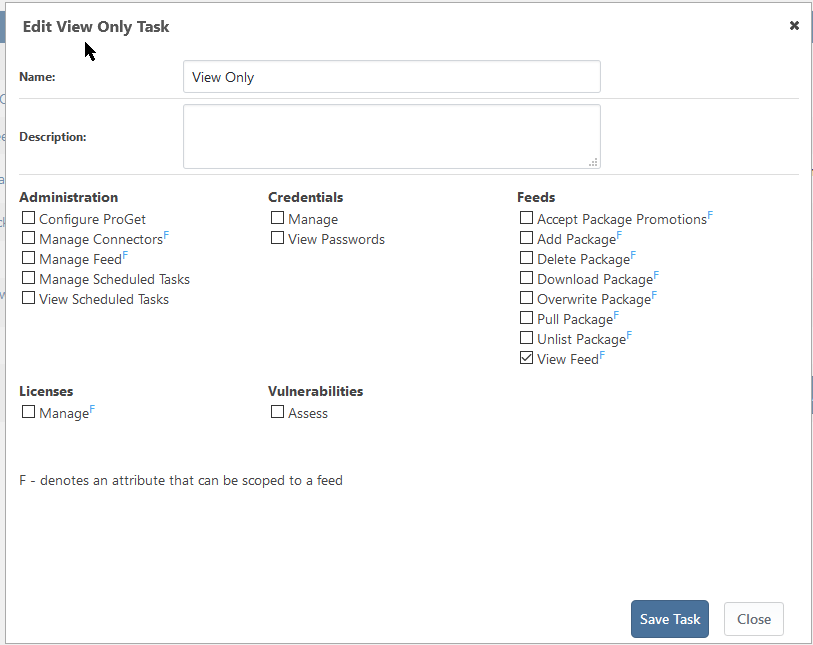
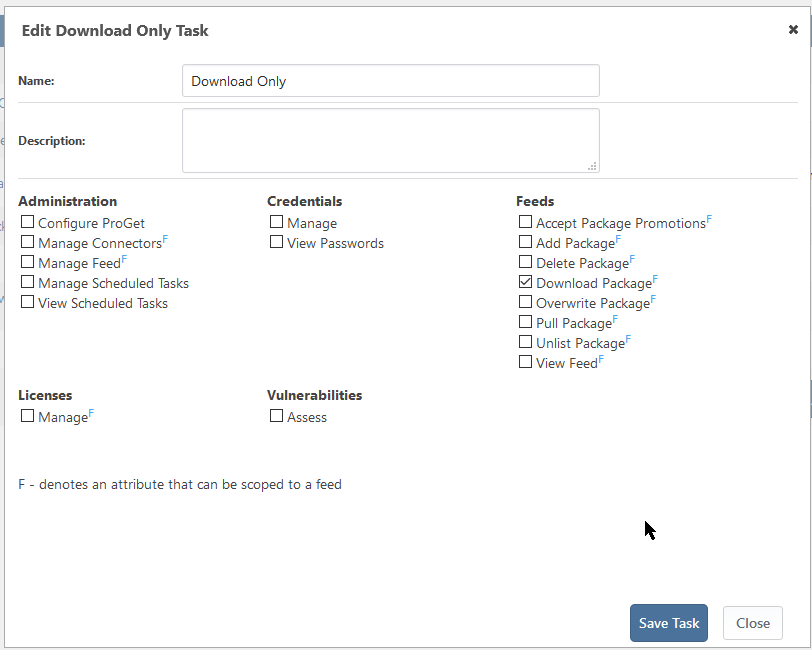
I tested the scenario where I setup anonymous to view only and a user to download only and it successfully authenticated and downloaded the package for me. Would you be able to share the custom tasks you are using for the anonymous user and the user that has download only?
Here is what I setup:
View Only
Download Only
If you give the user View & Download rights, does it work?
Thanks,
Rich -
@rhessinger The user actually has view and download. I don't think its related with that since mono works fine. I don't know if me going to the file system and rename all directories/ nupkg to lower case without changing anything in the database could have caused any issue. Is there any data related to package name stored in the DB? That was the only manual operation I did after the upgrade cause of that bug that apparently was found and fixed on the latest version. (proget:5.3.13-ci.2)
Lets say in file system I had My.Package.Hello/My.Package.Hello.nupkg and I renamed to my.package.hello/my.package.hello.nupkg
-
Hi @nuno-guerreiro-rosa_9280,
If you upload a new package, can you download it then? That would be the best way to verify the casing change did not affect the authentication.
Also, what user directory are you using? Are you using the built-in user directory, Active Directory, or LDAP Legacy?
Thanks,
Rich -
@rhessinger Built in directory.
-
Hi @nuno-guerreiro-rosa_9280,
Have you tried uploading a new NuGet package and tried downloading it? I would just like to rule out the directory and file renaming. I'm running the core version locally and I'm not currently able to recreate the authentication issues in my tests.
Thanks,
Rich -
@rhessinger I will try to upgrade again when I have some time with the latest ci which has the case sensitive fix and let you know the behavior. The mono version is working fine though.
-
@rhessinger I have upgraded to proget:5.3.13-ci.5 and both NuGet restores and docker login started failing
Error
administrator@docker01:/opt/proget$ docker login proget.myinstance.com
Username: example
Password: example
Error response from daemon: login attempt to https://proget.myinstance.com/v2/ failed with status: 401 Unauthorized/var/log/syslog
Oct 7 08:36:55 docker01 dockerd[1079]: time="2020-10-07T08:36:55.735970715+02:00" level=info msg="Error logging in to v2 endpoint, trying next endpoint: login attempt to https://proget.myinstance.com/v2/ failed with status: 401 Unauthorized"
Oct 7 08:36:55 docker01 dockerd[1079]: time="2020-10-07T08:36:55.736102221+02:00" level=error msg="Handler for POST /v1.37/auth returned error: login attempt to https:/proget.myinstance.com/v2/ failed with status: 401 Unauthorized"administrator@docker01:/opt/proget$ docker version
Client:
Version: 18.03.1-ce
API version: 1.37
Go version: go1.9.5
Git commit: 9ee9f40
Built: Thu Apr 26 07:17:20 2018
OS/Arch: linux/amd64
Experimental: false
Orchestrator: swarmServer:
Engine:
Version: 18.03.1-ce
API version: 1.37 (minimum version 1.12)
Go version: go1.9.5
Git commit: 9ee9f40
Built: Thu Apr 26 07:15:30 2018
OS/Arch: linux/amd64OS information:
NAME="Ubuntu"
VERSION="16.04.6 LTS (Xenial Xerus)"
ID=ubuntu
ID_LIKE=debian
PRETTY_NAME="Ubuntu 16.04.6 LTS"
VERSION_ID="16.04"
HOME_URL="http://www.ubuntu.com/"
SUPPORT_URL="http://help.ubuntu.com/"
BUG_REPORT_URL="http://bugs.launchpad.net/ubuntu/"
VERSION_CODENAME=xenial
UBUNTU_CODENAME=xenialDotnet restore on windows fails on all packages:
C:\Program Files\dotnet\sdk\3.1.401\NuGet.targets(128,5): error : Failed to download package 'xxxx.1.0.5' from 'https://proget.myinstance.com/nuget/feed-nuget/v3/flatcontainer/xxxx/1.0.5/xxx.1.0.5.nupkg'.
C:\Program Files\dotnet\sdk\3.1.401\NuGet.targets(128,5): error : Response status code does not indicate success: 401 (Unauthorized). -
Hi @nuno-guerreiro-rosa_9280,
I was finally able to recreate the issue. We created a ticket, ILIB-98, to track the issue. It will be released on Friday with ProGet 5.3.13.
Thanks,
Rich -
@rhessinger Nice to hear, looking forward to try a final version so I can upgrade to .net core version and with some luck, will achieve better performance because I am running it in 4 vCPU server with 32 gb ram and its not very normal that with a single client when doing a net restore it starts throwing timeout exceptions. Have you tried to do some load tests on restore to find out why it overwhelms the server so easily? Let's say I have 40 nuget packages from public nuget.org and 2 from proget. It will still query 40 packages in proget to find out it doesn't exist in the server. I believe those 40 package checks might be overwhelming the server. Just a guess.
-
Hi @nuno-guerreiro-rosa_9280,
The .NET Core version is definitely more effecient than the mono version. One of the biggest issues with mono is how it manages web requests. Mono reimplemented its web client and connection pool from scratch due to the complexity and internal dependencies of the .NET Framework. This is probably part of the reason you see the mono version tax the server a bit. As for NuGet querying all 40 packages in ProGet, we don't have much control over that. NuGet queries all sources in the list until it finds one. It will do custom sources first then fallback to NuGet.org last. There is an interesting ticket on NuGet's GitHub page discussing the priority (https://github.com/NuGet/Home/issues/3676).
Thanks,
Rich -
@rhessinger I have upgraded to ProGet v5.3.13 and the login issue still occurs. I had to revert back to progetmono to be able to perform docker login.
-
@rhessinger I have done some more testing and confirm that the NuGet restore is now working however the docker login (Unauthorized error) is still failing so that still remains to be fixed. Maybe the same issue but now with docker login ?
Login did not succeed, error: Error response from daemon: login attempt to https://proget.myinstance.io/v2/ failed with status: 401 Unauthorized
/var/log/syslog
Oct 10 23:54:21 docker01 dockerd[1079]: time="2020-10-10T23:54:21.726102349+02:00" level=info msg="Error logging in to v2 endpoint, trying next endpoint: login attempt to https://proget.myinstance.io/v2/ failed with status: 401 Unauthorized"
Oct 10 23:54:21 docker01 dockerd[1079]: time="2020-10-10T23:54:21.727052689+02:00" level=error msg="Handler for POST /v1.37/auth returned error: login attempt to https://proget.myinstance.io/v2/ failed with status: 401 Unauthorized" -
Hi @nuno-guerreiro-rosa_9280,
Thank you for all the extra information. I believe I have found the culprit, but I will need to work with the team internally to determine the proper fix. It looks like the call to
/v2/that tells docker it needs to authenticate is not returning the proper headers. This is a .NET Core only issue.The reason that Docker is the only feed affected now is because of how the docker client/api works. It basically walks through the process of an API looking for the API to return very specific errors and headers. That is how the client knows what to do next. In the case of auth, it will first hit
/v2/and look for a 401 unauthroized and some specific headers to tell it to redirect to/v2/_authand to pass anAuthorizeheader. That is not happening. I will update when we have scheduled this for release.Thanks,
Rich -
Hi @nuno-guerreiro-rosa_9280,
The docker login issue has been scheduled to release in ProGet 5.3.14 on October 30, 2020. I will let you know if anything changes.
Thanks,
Rich


Hello! It looks like you're interested in this conversation, but you don't have an account yet.
Getting fed up of having to scroll through the same posts each visit? When you register for an account, you'll always come back to exactly where you were before, and choose to be notified of new replies (either via email, or push notification). You'll also be able to save bookmarks and upvote posts to show your appreciation to other community members.
With your input, this post could be even better 💗
Register Login