Inedo Community Forums Forums
    • Recent
    • Tags
    • Popular
    • Login

    Welcome to the Inedo Forums! Check out the Forums Guide for help getting started.

    If you are experiencing any issues with the forum software, please visit the Contact Form on our website and let us know!

    Nuget Feed Connection timeout

    Scheduled Pinned Locked Moved Support
    22 Posts 4 Posters 85 Views 1 Watching
    Loading More Posts
    • Oldest to Newest
    • Newest to Oldest
    • Most Votes
    Reply
    • Reply as topic
    Log in to reply
    This topic has been deleted. Only users with topic management privileges can see it.
    • J Offline
      jyip_5228
      last edited by

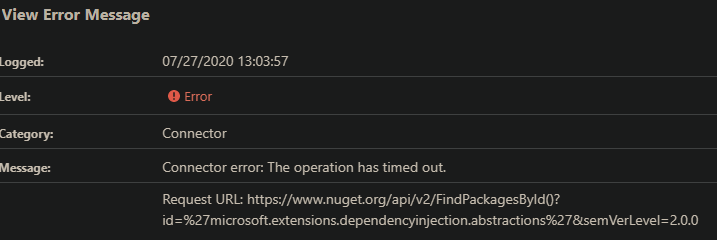
      actually I would like to add that Proget is also reaching out to nuget.org to search for internal packages as well and gets a timeout. Is it suppose to reach out for something that it should have found locally?
      I wonder if these additional calls to nuget.org contributes to to this exception that I have also been getting.

      Details: System.InvalidOperationException: Timeout expired. The timeout period elapsed prior to obtaining a connection from the pool. This may have occurred because all pooled connections were in use and max pool size was reached.
      
      1 Reply Last reply Reply Quote 0
      • rhessingerR Offline
        rhessinger inedo-engineer
        last edited by

        Hi @jyip_5228,

        The last exception you are seeing is currently a known issue that we are currently working through. We have noticed this tends to affect the docker based ProGet installations the most. In most cases, increasing the max connection pool limit in the SQL connection string seems to fix the issue. Depending on your SQL Server setup, you may need to increase the allowed connections on SQL Server as well. Can you please try to increase the max connection pool in your SQL connection string? Also, can you please tell us what version and edition of SQL Server you are currently running?

        Thanks,
        Rich

        Products Engineer, Inedo

        1 Reply Last reply Reply Quote 0
        • J Offline
          jyip_5228
          last edited by

          i am running MSSQL 2017 in docker, will that require increasing the max allowed connections on the SQL server as well? I will increase the max pool size to 300 and see how that goes.

          1 Reply Last reply Reply Quote 0
          • rhessingerR Offline
            rhessinger inedo-engineer
            last edited by

            Hi @jyip_5228,

            The default setting for SQL Server 2017 is unlimited. As long as you didnt set one on your SQL Server, then you should be good.

            Thanks,
            Rich

            Products Engineer, Inedo

            1 Reply Last reply Reply Quote 0
            • J Offline
              jyip_5228
              last edited by

              i set it to 300 in the connection string still seeing max pool, gonna increase it to 500 and see how that goes.

              1 Reply Last reply Reply Quote 0
              • J Offline
                jyip_5228
                last edited by

                had to up it to 1000 before i stopped seeing the issue

                1 Reply Last reply Reply Quote 0
                • rhessingerR Offline
                  rhessinger inedo-engineer
                  last edited by

                  Hi @jyip_5228,

                  Thanks for giving me the updated counts. Glad this workaround is working for you. We are still working on the issue internally. Do you happen to notice any other errors in the logs right before the timeout happens?

                  Thanks,
                  Rich

                  Products Engineer, Inedo

                  1 Reply Last reply Reply Quote 0
                  • J Offline
                    jyip_5228
                    last edited by

                    Actually seems like 1000 is not enough, i just hit the error again upon compiling a bigger project. These are the two errors that are grouped together usually.

                     An error occurred processing a GET request to http://xxxxx.nupkg: Timeout expired. The timeout period elapsed prior to obtaining a connection from the pool. This may have occurred because all pooled connections were in use and max pool size was reached.
                    
                    An error occurred in the web application: Timeout expired. The timeout period elapsed prior to obtaining a connection from the pool. This may have occurred because all pooled connections were in use and max pool size was reached.
                    
                    1 Reply Last reply Reply Quote 0
                    • rhessingerR Offline
                      rhessinger inedo-engineer
                      last edited by

                      Hi @jyip_5228,

                      Thanks for the update. I'm currently implementing a potential fix to the connection stuff. I'll let you know when I have something ready.

                      Thanks,
                      Rich

                      Products Engineer, Inedo

                      1 Reply Last reply Reply Quote 0
                      • rhessingerR Offline
                        rhessinger inedo-engineer
                        last edited by

                        Hi @jyip_5228,

                        Just an update! We will be shipping a potential fix in PG-1783, which adds a new checkbox in advanced settings (unchecked by default):

                        ☑ Close Database Connections Early
                        EXPERIMENTAL (for debugging/testing only) - As of ProGet 5.3, database connections are left open during the lifecycle of a NuGet API request as a means to reduce overhead; however, this may be causing ProGet to run out of available connections to SQL Server. Set this value true to open/close database connections as needed on NuGet feeds.

                        We'll update when this is shipped --- but if we can get some folks to verify that this works better (we can't repro, at all 😦 ), then we will likely make it the default. Hopefully this will do it. Seems better than raising connection pool limits 🤔

                        If so, then the savings in connection open/close overhead don't seem to make it particularly worthwhile. This "keep open" technique made a ton of differences elsewhere in our software, but since a NuGet API requests may yield a ton of other network requests (via connectors) and block, the pool may be getting drained too quickly...

                        just a theory, as I mentioned. Anyway hope this helps, stay tuned!!

                        Thanks!

                        Products Engineer, Inedo

                        1 Reply Last reply Reply Quote 0
                        • J Offline
                          jyip_5228
                          last edited by

                          Great! hoping this will fix the issue.

                          1 Reply Last reply Reply Quote 0
                          • rhessingerR Offline
                            rhessinger inedo-engineer
                            last edited by

                            Hi @jyip_5228 ,

                            We just released ProGet 5.3.8, which includes the Close Database Connections Early option in the advanced settings. Could you please upgrade and give this a try?

                            Thanks,
                            Rich

                            Products Engineer, Inedo

                            1 Reply Last reply Reply Quote 0
                            • J Offline
                              jyip_5228
                              last edited by

                              hi, it looks good so far, will see if it helps other issues as well.

                              1 Reply Last reply Reply Quote 0
                              • J Offline
                                jyip_5228
                                last edited by

                                Hi I'm running 5.3.10 and getting timeouts again / max pool reached, is the database issue occurring again?

                                An error occurred in the web application: Timeout expired. The timeout period elapsed prior to obtaining a connection from the pool. This may have occurred because all pooled connections were in use and max pool size was reached.
                                 Details: URL: http://xxx/nuget/ks-nuget/v3/flatcontainer/xxx/xxx/xxxxx.nupkg
                                Referrer: (not set)
                                User: (unknown)
                                User Agent: NuGet Desktop MSBuild Task/5.5.0 (Microsoft Windows NT 10.0.18363.0)
                                Stack trace: at System.Data.ProviderBase.DbConnectionFactory.TryGetConnection (System.Data.Common.DbConnection owningConnection, System.Threading.Tasks.TaskCompletionSource`1[TResult] retry, System.Data.Common.DbConnectionOptions userOptions, System.Data.ProviderBase.DbConnectionInternal oldConnection, System.Data.ProviderBase.DbConnectionInternal& connection) [0x0024d] in <0864334e7e474248b37afca9b637daa9>:0
                                at System.Data.ProviderBase.DbConnectionInternal.TryOpenConnectionInternal (System.Data.Common.DbConnection outerConnection, System.Data.ProviderBase.DbConnectionFactory connectionFactory, System.Threading.Tasks.TaskCompletionSource`1[TResult] retry, System.Data.Common.DbConnectionOptions userOptions) [0x00036] in <0864334e7e474248b37afca9b637daa9>:0
                                at System.Data.ProviderBase.DbConnectionClosed.TryOpenConnection (System.Data.Common.DbConnection outerConnection, System.Data.ProviderBase.DbConnectionFactory connectionFactory, System.Threading.Tasks.TaskCompletionSource`1[TResult] retry, System.Data.Common.DbConnectionOptions userOptions) [0x00000] in <0864334e7e474248b37afca9b637daa9>:0
                                at System.Data.SqlClient.SqlConnection.TryOpen (System.Threading.Tasks.TaskCompletionSource`1[TResult] retry) [0x0005d] in <0864334e7e474248b37afca9b637daa9>:0
                                at System.Data.SqlClient.SqlConnection.Open () [0x0003b] in <0864334e7e474248b37afca9b637daa9>:0
                                at Inedo.Data.SqlServerDatabaseContext.CreateConnection () [0x0006c] in <8a0468ee94a94ef1b2bba97871f29990>:0
                                at Inedo.Data.DatabaseContext.ExecuteInternal (System.String storedProcName, Inedo.Data.GenericDbParameter[] parameters) [0x00064] in <8a0468ee94a94ef1b2bba97871f29990>:0
                                at Inedo.Data.SqlServerDatabaseContext.ExecuteInternal (System.String storedProcName, Inedo.Data.GenericDbParameter[] parameters) [0x00005] in <8a0468ee94a94ef1b2bba97871f29990>:0
                                at Inedo.Data.DatabaseContext+<>c__DisplayClass29_0`1[TRow].<EnumerateTable>b__0 () [0x00000] in <8a0468ee94a94ef1b2bba97871f29990>:0
                                at Inedo.Data.StrongDataReader+<Read>d__11`1[TRow].MoveNext () [0x0003e] in <8a0468ee94a94ef1b2bba97871f29990>:0
                                at System.Linq.Enumerable.TryGetFirst[TSource] (System.Collections.Generic.IEnumerable`1[T] source, System.Boolean& found) [0x00045] in <22384ee444974b39bb55b725de39c721>:0
                                at System.Linq.Enumerable.FirstOrDefault[TSource] (System.Collections.Generic.IEnumerable`1[T] source) [0x00000] in <22384ee444974b39bb55b725de39c721>:0
                                at Inedo.ProGet.Data.DB+Context.Feeds_GetFeed (System.Nullable`1[T] Feed_Id, System.String Feed_Name) [0x0003d] in <888866fba54f44d68ecb60a2adf95719>:0
                                at Inedo.ProGet.Feeds.Feed.GetFeed (System.String feedName, Inedo.ProGet.Data.DB+Context externalDbContext) [0x0000b] in <888866fba54f44d68ecb60a2adf95719>:0
                                at Inedo.ProGet.WebApplication.FeedEndpoints.FeedEndpointHandler.GetHttpHandler (Inedo.Web.Handlers.GetHandlerParams args) [0x0017e] in <d560b10d729641519d596b0266d076a4>:0
                                at Inedo.Web.Handlers.DynamicHttpHandling.GetHandler (System.Web.HttpContext context, System.String requestType, System.String url, System.String pathTranslated) [0x0003b] in <8a0468ee94a94ef1b2bba97871f29990>:0
                                at Inedo.Web.InedoHttpModule.MapHandlerAndBeginRequestAsync (System.Web.HttpApplication app) [0x00029] in <8a0468ee94a94ef1b2bba97871f29990>:0
                                at Inedo.Web.InedoHttpModule.HandleBeginRequestInternalAsync (System.Web.HttpApplication app) [0x0000f] in <8a0468ee94a94ef1b2bba97871f29990>:0
                                at Inedo.Web.InedoHttpModule.ProcessBegin (System.Object sender, System.EventArgs e, System.AsyncCallback cb, System.Object extraData) [0x0000d] in <8a0468ee94a94ef1b2bba97871f29990>:0
                                at System.Web.HttpApplication+<RunHooks>d__217.MoveNext () [0x000a4] in <b4f0b153c02f4f0588d3f7549d75281b>:0
                                at System.Web.HttpApplication+<Pipeline>d__225.MoveNext () [0x0012c] in <b4f0b153c02f4f0588d3f7549d75281b>:0
                                at System.Web.HttpApplication.Tick () [0x00000] in <b4f0b153c02f4f0588d3f7549d75281b>:0
                                
                                1 Reply Last reply Reply Quote 0
                                • rhessingerR Offline
                                  rhessinger inedo-engineer
                                  last edited by

                                  Hi @jyip_5228,

                                  I just verified and the fix is still in place. We have seen connection issues in the past with the Mono framework due to how connection sharing is implemented in the mono framework. How often does this issue happen? If you restart the ProGet image, how long before you see the connection pool error?

                                  Just to let you know, as part of ProGet 5.3.10 release, we shipped the ProGetCore container image as well.

                                  You can follow the normal steps in the Linux and Docker Installation Guide to install/upgrade, but just use progetcore for the container instead of proget.

                                  Aside from support for the Lucene-based Maven feed indexing (in progress), it seems to be feature complete. And of course, if there are problems, you can switch back to proget:5.3.10 or downgrade as needed (no database schema changes).

                                  For example, docker pull proget.inedo.com/productimages/inedo/progetcore:5.3.10

                                  Thanks,
                                  Rich

                                  Products Engineer, Inedo

                                  1 Reply Last reply Reply Quote 0
                                  • J Offline
                                    jyip_5228
                                    last edited by

                                    I havent tracked it, but i restarted container on Monday, by Tuesday morning when people returned to office/ started running builds, I started seeing Timeout errors. I will switch to the core version and see how that goes.

                                    1 Reply Last reply Reply Quote 0
                                    • rhessingerR Offline
                                      rhessinger inedo-engineer
                                      last edited by

                                      Hi @jyip_5228,

                                      Are you still running the default max connections property? Or have you increased it? Also, how many concurrent builds are you running at a time?

                                      Please send us an update on how the .Net Core version is working out for you.

                                      Thanks,
                                      Rich

                                      Products Engineer, Inedo

                                      1 Reply Last reply Reply Quote 0
                                      • P Offline
                                        p.bruch_5023
                                        last edited by

                                        Hello,

                                        we are suffering this problem too. I have to restart Proget every 2 hours because our build is hanging in NuGet restore step and proget is logging that the max connection pool size has been reached.

                                        proget        | An error occurred in the web application: Timeout expired.  The timeout period elapsed prior to completion of the operation or the server is not responding.
                                        proget        | An error occurred in the web application: Timeout expired.  The timeout period elapsed prior to obtaining a connection from the pool.  This may have occurred because all pooled connections were in use and max pool size was reached.
                                         An error occurred in the web application: Timeout expired.  The timeout period elapsed prior to obtaining a connection from the pool.  This may have occurred because all pooled connections were in use and max pool size was reached.
                                        proget        | An error occurred in the web application: Timeout expired.  The timeout period elapsed prior to obtaining a connection from the pool.  This may have occurred because all pooled connections were in use and max pool size was reached.
                                        proget        | fail: Microsoft.AspNetCore.Server.Kestrel[13]
                                        proget        |       Connection id "0HM4OCNCDJEIM", Request id "0HM4OCNCDJEIM:00000002": An unhandled exception was thrown by the application.
                                        proget        | System.InvalidOperationException: Timeout expired.  The timeout period elapsed prior to obtaining a connection from the pool.  This may have occurred because all pooled connections were in use and max pool size was reached.
                                        proget        |    at System.Data.ProviderBase.DbConnectionFactory.TryGetConnection(DbConnection owningConnection, TaskCompletionSource`1 retry, DbConnectionOptions userOptions, DbConnectionInternal oldConnection, DbConnectionInternal& connection)
                                        proget        |    at System.Data.ProviderBase.DbConnectionInternal.TryOpenConnectionInternal(DbConnection outerConnection, DbConnectionFactory connectionFactory, TaskCompletionSource`1 retry, DbConnectionOptions userOptions)
                                        proget        |    at System.Data.SqlClient.SqlConnection.TryOpen(TaskCompletionSource`1 retry)
                                        proget        |    at System.Data.SqlClient.SqlConnection.Open()
                                        proget        |    at Inedo.Data.SqlServerDatabaseContext.CreateConnection()
                                        proget        |    at Inedo.Data.DatabaseContext.ExecuteInternal(String storedProcName, GenericDbParameter[] parameters)
                                        proget        |    at Inedo.Data.SqlServerDatabaseContext.ExecuteInternal(String storedProcName, GenericDbParameter[] parameters)
                                        proget        |    at Inedo.Data.StrongDataReader.Read[TRow](Func`1 getReader, Boolean disposeReader)+MoveNext()
                                        proget        |    at System.Collections.Generic.List`1..ctor(IEnumerable`1 collection)
                                        proget        |    at System.Linq.Enumerable.ToList[TSource](IEnumerable`1 source)
                                        proget        |    at Inedo.ProGet.Data.DB.Configuration_GetConfiguration() in C:\InedoAgent\BuildMasterTemp\192.168.44.60\Temp\_E79286\Src\ProGetCoreEx\Data\DB.cs:line 243
                                        proget        |    at Inedo.ProGet.InternalConfig.ReadConfigValues() in C:\InedoAgent\BuildMasterTemp\192.168.44.60\Temp\_E79286\Src\ProGetCoreEx\Configuration\ProGetConfig.cs:line 200
                                        proget        |    at Inedo.LazyCached`1.GetValue()
                                        proget        |    at Inedo.ProGet.ProGetConfig.Web.get_CustomErrors() in C:\InedoAgent\BuildMasterTemp\192.168.44.60\Temp\_E79286\Src\ProGetCoreEx\Configuration\ProGetConfig.Web.cs:line 63
                                        proget        |    at Inedo.ProGet.WebApplication.ProGetHttpModule.Error(HttpApplication app) in C:\InedoAgent\BuildMasterTemp\192.168.44.60\Temp\_E79286\Src\ProGet.WebApplication\ProGetHttpModule.cs:line 392
                                        proget        |    at Inedo.Web.InedoHttpModule.Inedo.Web.IAhWebModule.ErrorAsync(HttpApplication app)
                                        proget        |    at Inedo.Web.AhWebMiddleware.InvokeAsync(HttpContext context)
                                        proget        |    at Inedo.Web.AhWebMiddleware.InvokeAsync(HttpContext context)
                                        proget        |    at Microsoft.AspNetCore.Server.Kestrel.Core.Internal.Http.HttpProtocol.ProcessRequests[TContext](IHttpApplication`1 application)
                                        proget        | An error occurred in the web application: Timeout expired.  The timeout period elapsed prior to obtaining a connection from the pool.  This may have occurred because all pooled connections were in use and max pool size was reached.
                                        proget        | An error occurred in the web application: Timeout expired.  The timeout period elapsed prior to obtaining a connection from the pool.  This may have occurred because all pooled connections were in use and max pool size was reached.
                                        proget        | An error occurred in the web application: Timeout expired.  The timeout period elapsed prior to obtaining a connection from the pool.  This may have occurred because all pooled connections were in use and max pool size was reached.
                                        proget        | An error occurred in the web application: Timeout expired.  The timeout period elapsed prior to obtaining a connection from the pool.  This may have occurred because all pooled connections were in use and max pool size was reached.
                                        proget        | fail: Microsoft.AspNetCore.Server.Kestrel[13]
                                        proget        |       Connection id "0HM4OCNCDJEI2", Request id "0HM4OCNCDJEI2:00000001": An unhandled exception was thrown by the application.
                                        proget        | System.InvalidOperationException: Timeout expired.  The timeout period elapsed prior to obtaining a connection from the pool.  This may have occurred because all pooled connections were in use and max pool size was reached.
                                        proget        |    at System.Data.ProviderBase.DbConnectionFactory.TryGetConnection(DbConnection owningConnection, TaskCompletionSource`1 retry, DbConnectionOptions userOptions, DbConnectionInternal oldConnection, DbConnectionInternal& connection)
                                        proget        |    at System.Data.ProviderBase.DbConnectionInternal.TryOpenConnectionInternal(DbConnection outerConnection, DbConnectionFactory connectionFactory, TaskCompletionSource`1 retry, DbConnectionOptions userOptions)
                                        proget        |    at System.Data.SqlClient.SqlConnection.TryOpen(TaskCompletionSource`1 retry)
                                        proget        |    at System.Data.SqlClient.SqlConnection.Open()
                                        proget        |    at Inedo.Data.SqlServerDatabaseContext.CreateConnection()
                                        proget        |    at Inedo.Data.DatabaseContext.ExecuteInternal(String storedProcName, GenericDbParameter[] parameters)
                                        proget        |    at Inedo.Data.SqlServerDatabaseContext.ExecuteInternal(String storedProcName, GenericDbParameter[] parameters)
                                        proget        |    at Inedo.Data.StrongDataReader.Read[TRow](Func`1 getReader, Boolean disposeReader)+MoveNext()
                                        proget        |    at System.Collections.Generic.List`1..ctor(IEnumerable`1 collection)
                                        proget        |    at System.Linq.Enumerable.ToList[TSource](IEnumerable`1 source)
                                        proget        |    at Inedo.ProGet.Data.DB.Configuration_GetConfiguration() in C:\InedoAgent\BuildMasterTemp\192.168.44.60\Temp\_E79286\Src\ProGetCoreEx\Data\DB.cs:line 243
                                        proget        |    at Inedo.ProGet.InternalConfig.ReadConfigValues() in C:\InedoAgent\BuildMasterTemp\192.168.44.60\Temp\_E79286\Src\ProGetCoreEx\Configuration\ProGetConfig.cs:line 200
                                        proget        |    at Inedo.LazyCached`1.GetValue()
                                        proget        |    at Inedo.ProGet.ProGetConfig.Web.get_CustomErrors() in C:\InedoAgent\BuildMasterTemp\192.168.44.60\Temp\_E79286\Src\ProGetCoreEx\Configuration\ProGetConfig.Web.cs:line 63
                                        proget        |    at Inedo.ProGet.WebApplication.ProGetHttpModule.Error(HttpApplication app) in C:\InedoAgent\BuildMasterTemp\192.168.44.60\Temp\_E79286\Src\ProGet.WebApplication\ProGetHttpModule.cs:line 392
                                        proget        |    at Inedo.Web.InedoHttpModule.Inedo.Web.IAhWebModule.ErrorAsync(HttpApplication app)
                                        proget        |    at Inedo.Web.AhWebMiddleware.InvokeAsync(HttpContext context)
                                        proget        |    at Inedo.Web.AhWebMiddleware.InvokeAsync(HttpContext context)
                                        proget        |    at Microsoft.AspNetCore.Server.Kestrel.Core.Internal.Http.HttpProtocol.ProcessRequests[TContext](IHttpApplication`1 application)
                                        

                                        We are building our software inside docker containers, which means all NuGet packages need to be restored for each build. Sometimes we have 2-3 parallel builds. We are using proget.inedo.com/productimages/inedo/proget:5.3.16 with mcr.microsoft.com/mssql/server:2019-latest.
                                        Any ideas how to overcome this?

                                        Best regards
                                        Peter

                                        atrippA 1 Reply Last reply Reply Quote 0
                                        • atrippA Offline
                                          atripp inedo-engineer @p.bruch_5023
                                          last edited by

                                          Hi @p-bruch_5023 can you post this to a Topic? It'll be a lot easier to track internally, and for other users to find since it's newer and different cases than other timeouts.

                                          1 Reply Last reply Reply Quote 0

                                          Hello! It looks like you're interested in this conversation, but you don't have an account yet.

                                          Getting fed up of having to scroll through the same posts each visit? When you register for an account, you'll always come back to exactly where you were before, and choose to be notified of new replies (either via email, or push notification). You'll also be able to save bookmarks and upvote posts to show your appreciation to other community members.

                                          With your input, this post could be even better 💗

                                          Register Login
                                          • 1
                                          • 2
                                          • 1 / 2
                                          • First post
                                            Last post
                                          Inedo Website Home • Support Home • Code of Conduct • Forums Guide • Documentation