Welcome to the Inedo Forums! Check out the Forums Guide for help getting started.
If you are experiencing any issues with the forum software, please visit the Contact Form on our website and let us know!
Connector errors, timeout, restart needed.
-
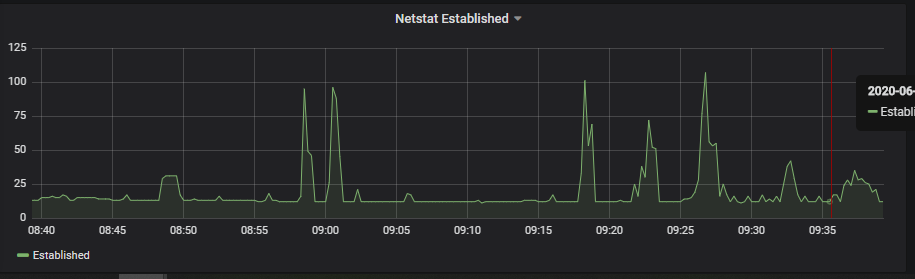
@rhessinger We have enabled the stub_status for Nginx, when the problem appeared just now the status showed the following page:
Active connections: 15
server accepts handled requests
428494 428494 756561
Reading: 0 Writing: 2 Waiting: 13We have some network connection monitoring with prometheus for the host and they show nothing specific (see attached image)
-
@rhessinger said in Connector errors, timeout, restart needed.:
Also, how many connectors do you have on your NuGet feed?
Sorry, I missed this question... We have four connectors (but only uses three of them):
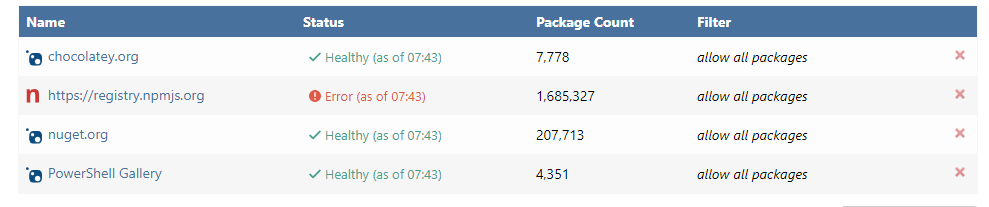
And when I looked that up I noticed that the one we don't use was marked with error, removed it.
-
-
@rhessinger 99% NuGet connector errors.
-
Hi @patchlings,
Thank you very much for the information. I'm researching the issue more on our side. I may send over some more questions your way while I'm working on this.
Thanks,
Rich -
Now it's seems flaky again:
nginx status:
Active connections: 57
server accepts handled requests
462208 462208 840656
Reading: 0 Writing: 30 Waiting: 27Main web UI can't be reached at all.
Ransudo kill -QUIT $MONO_PIDand got myself a huge thread dump with a lot of entries like this (let me know if you want me to supply the entire dump, (it's more then the allowed 32k chars):"Thread Pool Worker" at <unknown> <0xffffffff> at (wrapper managed-to-native) object.__icall_wrapper_mono_monitor_enter_v4_internal (object,intptr) [0x00000] in <c453bf849bb84e719dbec0475e99db95>:0 at System.Net.HttpListener.RegisterContext (System.Net.HttpListenerContext) [0x00035] in <4d8f95b7df544b3fa1a27dda924b4424>:0 at System.Net.HttpConnection.OnReadInternal (System.IAsyncResult) [0x0014c] in <4d8f95b7df544b3fa1a27dda924b4424>:0 at System.Net.HttpConnection.OnRead (System.IAsyncResult) [0x00006] in <4d8f95b7df544b3fa1a27dda924b4424>:0 at System.Net.Sockets.SocketAsyncResult/<>c.<Complete>b__27_0 (object) [0x0000b] in <4d8f95b7df544b3fa1a27dda924b4424>:0 at System.Threading.QueueUserWorkItemCallback.System.Threading.IThreadPoolWorkItem.ExecuteWorkItem () [0x00008] in <c453bf849bb84e719dbec0475e99db95>:0 at System.Threading.ThreadPoolWorkQueue.Dispatch () [0x00074] in <c453bf849bb84e719dbec0475e99db95>:0 at System.Threading._ThreadPoolWaitCallback.PerformWaitCallback () [0x00000] in <c453bf849bb84e719dbec0475e99db95>:0 at (wrapper runtime-invoke) <Module>.runtime_invoke_bool (object,intptr,intptr,intptr) [0x0002a] in <c453bf849bb84e719dbec0475e99db95>:0 -
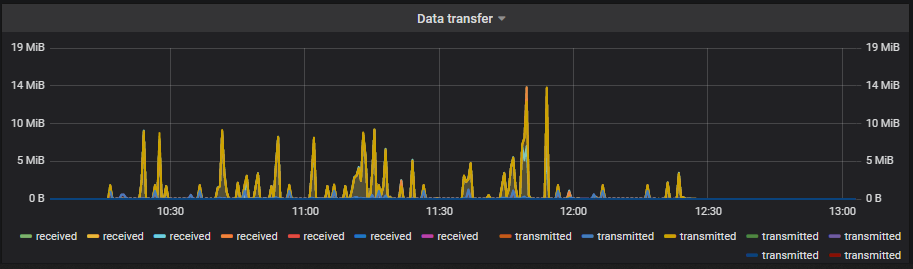
One interesting observation is that when the system "freezes" there seems to be no traffic at all (12:30):
-
Performing strace on the mono process gives a lot of:
[pid 26706] recvfrom(39, "", 8, 0, NULL, NULL) = 0
[pid 26706] recvfrom(39, "", 8, 0, NULL, NULL) = 0
[pid 26706] recvfrom(39, "", 8, 0, NULL, NULL) = 0
[pid 26706] recvfrom(39, "", 8, 0, NULL, NULL) = 0
[pid 26706] recvfrom(39, "", 8, 0, NULL, NULL) = 0
[pid 26706] recvfrom(39, "", 8, 0, NULL, NULL) = 0
[pid 26706] recvfrom(39, "", 8, 0, NULL, NULL) = 0
Then I found this: https://stackoverflow.com/questions/24000534/tracing-socket-file-descriptor-back-to-bound-address
So the next step will be to see if I can find out which socket that is actually appearing in the strace.
-
Hi @patchlings ,
Thanks for all this information. Would you be able to get me an open thread count for when everything is running fine and when things are not? You should be able to find it by running
sudo ps huH p <PID_OF_MONO_PROCESS> | wc -l. Also, are you running these commands inside the docker image? Or on the host?Thanks,
Rich -
@rhessinger Hi, if I run it on the host (or in the actual container) it seems to vary between 25-45, haven't seem anything different between when it behaves bad:
ubuntu@proget:/opt/provision/additional$ sudo ps huH p 12436 | wc -l 29 ubuntu@proget:/opt/provision/additional$ sudo ps huH p 12436 | wc -l 44 -
Hi @patchlings,
Thank you for checking this for me. So the good thing is that this is definitely not a threading issue. Can you give me a stub status when it's working during normal use and one after it starts behaving poorly?
Thanks,
Rich -
@rhessinger I will do that.
One note, it seems that running on debug logging level makes it a little more unstable. We are back to normal "warning" now and now it seems to be back at our regular "once a day" frequency. With debug it felt like 5 times a day.
-
Hi @patchlings,
Thanks! I'm not surprised that debug exaccerbates the issue, but it's definitely good to know.
Thanks,
Rich -
Now it misbehaves...
Active connections: 6
server accepts handled requests
 115659 115659 179524
Reading: 0 Writing: 1 Waiting: 5
Accessing feeds/default will show a "There was an error with a connector: The operation has timed out." All other feeds work as expected.
ubuntu@proget:~$ sudo ps huH p 18819 |wc -l
33
In the admin interface:
Request URL: https://nuget.org/api/v2/Search()?$top=25&$filter=IsAbsoluteLatestVersion&searchTerm=%27%27&targetFramework=%27%27&includePrerelease=true&semVerLevel=2.0.0

System.Net.WebException: The operation has timed out.
at System.Net.HttpWebRequest.RunWithTimeoutWorker[T] (System.Threading.Tasks.Task`1[TResult] workerTask, System.Int32 timeout, System.Action abort, System.Func`1[TResult] aborted, System.Threading.CancellationTokenSource cts) [0x000f8] in <4d8f95b7df544b3fa1a27dda924b4424>:0
at System.Net.HttpWebRequest.EndGetResponse (System.IAsyncResult asyncResult) [0x00020] in <4d8f95b7df544b3fa1a27dda924b4424>:0
at System.Threading.Tasks.TaskFactory`1[TResult].FromAsyncCoreLogic (System.IAsyncResult iar, System.Func`2[T,TResult] endFunction, System.Action`1[T] endAction, System.Threading.Tasks.Task`1[TResult] promise, System.Boolean requiresSynchronization) [0x0000f] in <c453bf849bb84e719dbec0475e99db95>:0
--- End of stack trace from previous location where exception was thrown ---

at Inedo.ProGet.Feeds.StrongConnector.GetDirectResponseAsync (System.String url) [0x000eb] in <dacb7de90ce24964b2da21b67ac5e1d1>:0
at Inedo.ProGet.Feeds.StrongConnector.GetCachedResponseAsync (System.String url) [0x000a8] in <dacb7de90ce24964b2da21b67ac5e1d1>:0
at Inedo.ProGet.Feeds.StrongConnector.GetCachedTextReaderAsync (System.String url) [0x00075] in <dacb7de90ce24964b2da21b67ac5e1d1>:0
at Inedo.ProGet.Feeds.NuGet.NuGetFeedClient.PerformRequestWithAbsoluteUrlAsync (System.String fullUrl) [0x000d9] in <dacb7de90ce24964b2da21b67ac5e1d1>:0
strace doesn't show anything obvious.
Restart docker container and now the /feed/default shows no problem. nginx status:
Active connections: 6 server accepts handled requests 115829 115829 180229 Reading: 0 Writing: 1 Waiting: 5 -
Hi @patchlings,
Thanks for all the data. I really appreciate your help with this! I'm currently reviewing our code to see if I can find a correlation with this.
Thanks,
Rich -
Hi @patchlings,
We believe this error is due to a regression/bug in the Mono, which is related to change to their HttpWebRequest stack. In the future, after Microsoft releases it, we plan to move to .NET 5 for a more stable platform.
The best resolution, for now, is to move to Windows/IIS; it's the most stable. Is this possible?
If not... we don't know when Mono will fix the bug, or if it's possible for us to work-around, but we think it will get resolved in the future. Would you be able to make ProGet restart once per day? I think this would help with the memory leak.
Thanks,
Rich -
Hi @rhessinger
Ok, the issue you found sounds interesting, but it seems to be more connected to the other problem we have: https://forums.inedo.com/topic/2887/proget-in-docker-linux-hanging-after-using-all-memory/6
And we are currently already restarting the docker container once a day to make sure that we don't run out of memory.
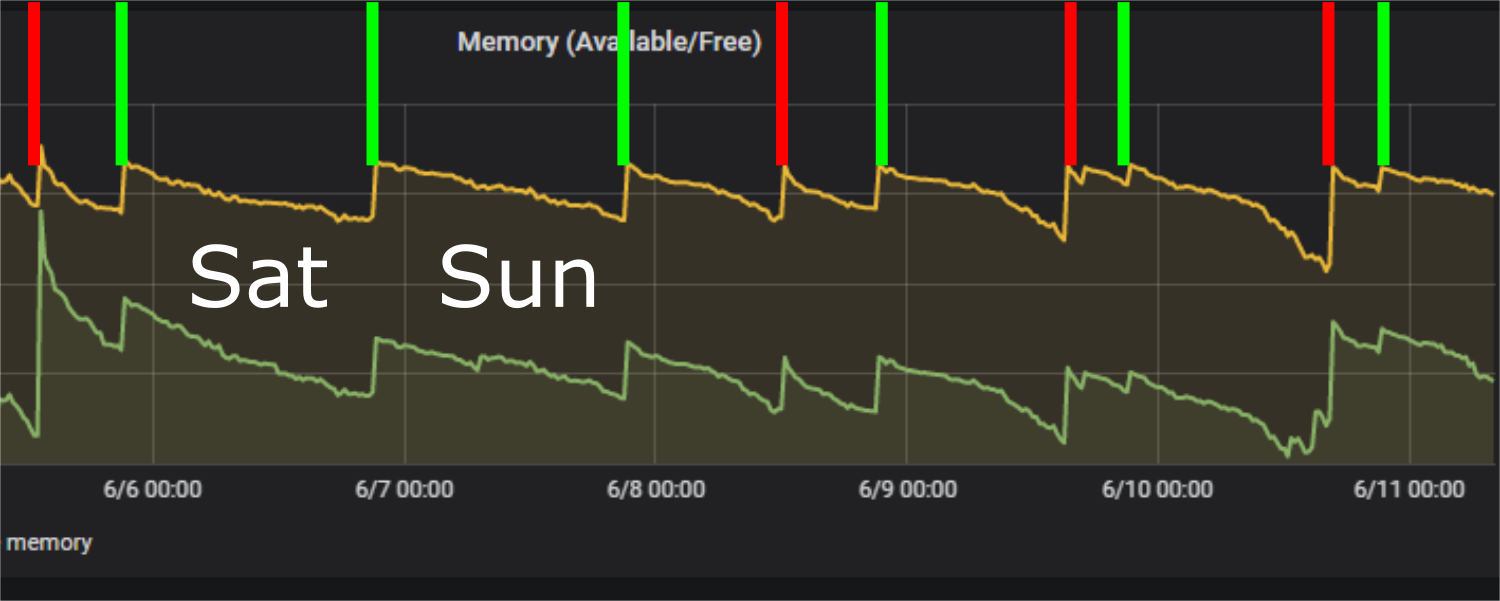
And looking into the memory graphs it looks like we experience the connection issue even if the memory consumption looks ok (Green bars = scheduled restarts, red bars = connector problems, yellow graph = available memory, green graph = free memory):
-- Magnus
-
Hi @patchlings ,
That is the heart of the Mono bug that I referenced. Currently Mono has a memory leak around HTTP requests which will cause our connectors to hang when the memory usage is too high. They have reduced the leaking substantially starting in Mono 5.16, but there is still a leak. If you search around on this error, you will find similar questions with almost identical errors still in 2020. Unfortunately, we are in the hands of the Mono team until we switch off Mono and migrate to .NET 5.
Thanks,
Rich -
@rhessinger Ok, then I understand. We will look into our options then. Depending on Mono fixing this seems like a bad solution as it seems to have appeared for quite some time.
Thanks for all your help!
What is the timeline of your Mono to .NET 5 conversion?
-
Hi @patchlings,
No problem! We are still investigating some workarounds, but we don't have anything specific yet.
We don't currently have a timeline for the .NET 5 switch. We have attempted a .NET Core transition in early 2019, but we ran into too many instability issues and scrapped it. We will wait for .NET 5 to be officially released (Microsoft says November 2020) before we attempt the switch, but it will all come down to the stability of ProGet on .NET 5.
Thanks,
Rich

Hello! It looks like you're interested in this conversation, but you don't have an account yet.
Getting fed up of having to scroll through the same posts each visit? When you register for an account, you'll always come back to exactly where you were before, and choose to be notified of new replies (either via email, or push notification). You'll also be able to save bookmarks and upvote posts to show your appreciation to other community members.
With your input, this post could be even better 💗
Register Login